> ## Documentation Index
> Fetch the complete documentation index at: https://docs.groundforge.ai/llms.txt
> Use this file to discover all available pages before exploring further.
# Introduction
> Connect Agents to Channels and MCP capabilities, govern actions, and understand every request.
GroundForge is a SaaS control plane for AI Agents and MCP servers.
You use GroundForge to:
* create **Channels** so people can reach an Agent through WhatsApp, email, Slack, or a webhook;
* connect Agents to their own tools or to capabilities exposed by an **MCP provider**;
* govern those actions with declarative **Gateway** rules: Allow, Observe, Review, or Block;
* send Review decisions to the **Operator Tasks** dashboard;
* understand individual requests in **Traces** and overall usage in **Analytics**.
Your Agent still decides what to do. GroundForge controls how requests enter, which actions may run, when a person must approve, and what is recorded.
[Open GroundForge](https://platform.groundforge.ai), sign in, and select the Organization and Workspace you want to use.
## GroundForge Request Flow
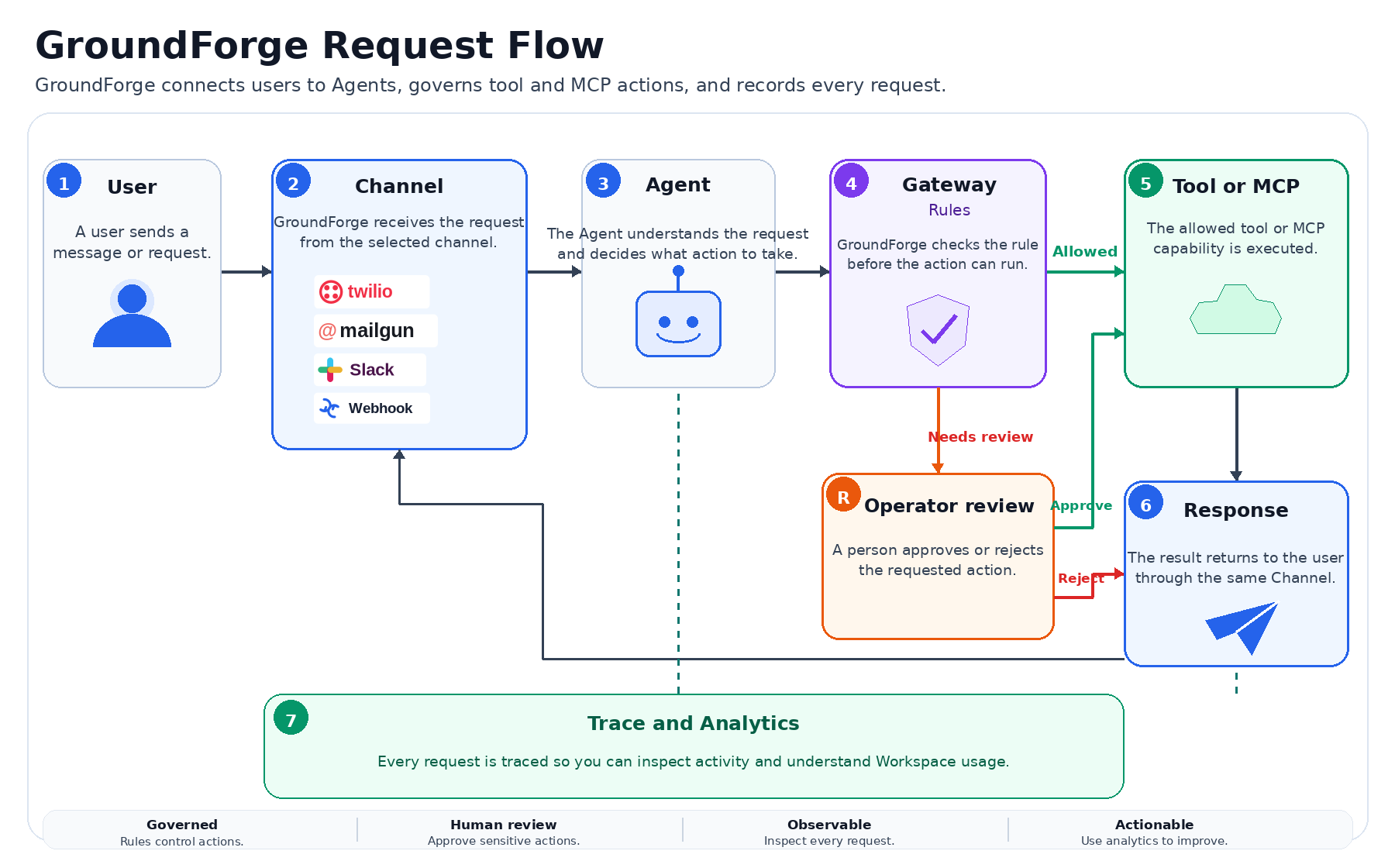 A request moves from the user to a Channel and then to the Agent. When the Agent selects a tool or MCP capability, a Gateway rule decides whether it can run immediately, needs operator approval, or must be blocked. GroundForge returns the response through the same Channel and records the request in Traces and Analytics.
> **Screenshot placeholder**\
> Add `/images/overview/workspace-home.png` showing the active Organization, Workspace, main navigation, and Dashboard.
## Learn with working examples
Discover and govern the official Python Weather MCP server.
Connect a LangChain weather Agent, with or without explicit adapters.
Start with [Quick Start](/quickstart), then read the [Resource Model](/concepts/resource-model).
A request moves from the user to a Channel and then to the Agent. When the Agent selects a tool or MCP capability, a Gateway rule decides whether it can run immediately, needs operator approval, or must be blocked. GroundForge returns the response through the same Channel and records the request in Traces and Analytics.
> **Screenshot placeholder**\
> Add `/images/overview/workspace-home.png` showing the active Organization, Workspace, main navigation, and Dashboard.
## Learn with working examples
Discover and govern the official Python Weather MCP server.
Connect a LangChain weather Agent, with or without explicit adapters.
Start with [Quick Start](/quickstart), then read the [Resource Model](/concepts/resource-model).